Introduction
Command-line application (CLI) that helps maintain a repertoire of already-learned folk tunes stored locally in an Obsidian vault.
The CLI selects a manageable number of tunes to review on a regular basis, records review state in the Obsidian vault, and supports filtering by tune metadata such as regional origin.
Installation
To install the CLI on your machine, run the following command in a terminal:
dotnet tool install --global CloudAwesome.FolkTune.Reviewer
N.B. To use the CLI after installation, you must have an existing Obsidian vault in the specified format, including a directory of tunes in markdown format and with the mandatory metadata in yaml front matter.
See the Installation page for detailed pre-requisites and installation instructions.
Available commands
Review command
This is the primary command provided for reviewing tunes. By default, the CLI will select the 10 most "in need of revision" tunes and present them to you to review.
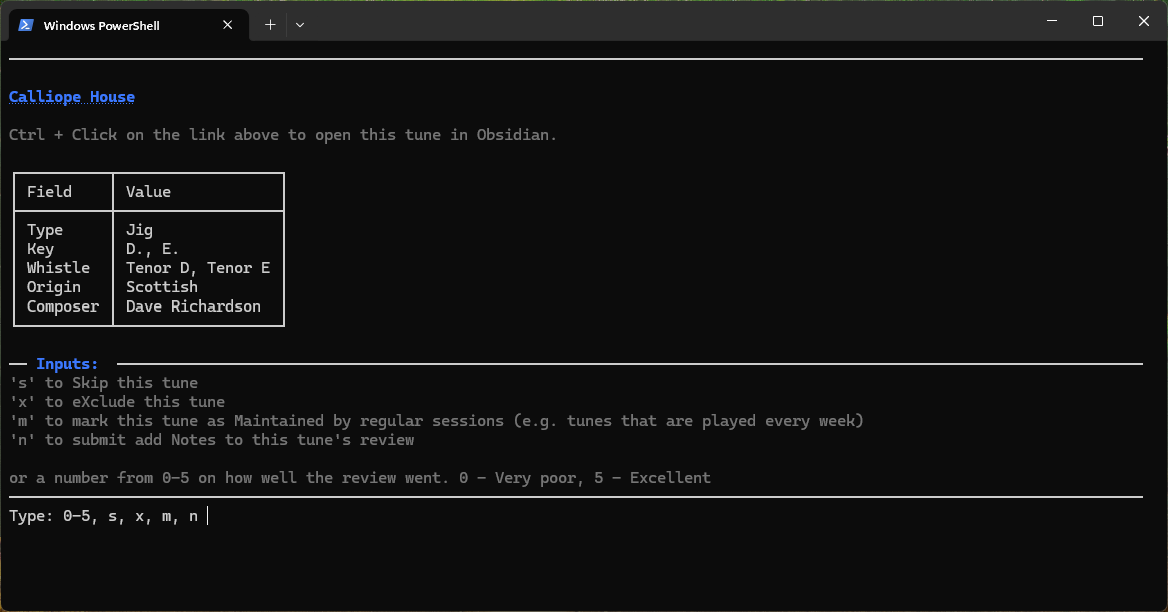
As a minimum, navigate to the root directory of your vault and run the following command:
tune-review review
See the Review command page for more detailed information and granular command flags.
Pick command
The pick command does not right back to your review database. It takes similar optional flags as are used in the review command and presents you with a table of tunes that match the filters.
But you are not asked to review them and results are not saved to the review database..
As a minimum, navigate to the root directory of your vault and run the following command:
tune-review pick
See the Pick command page for more detailed information and granular command flags.
Session command
As an alternative to reviewing tunes selected by the CLI, you also get the opportunity to play tunes when others play them at sessions.
If you take a list of the tunes played in a session in a text file (one tune per line), you can upload the file and the last-reviewed date will be updated for each tune.
No review score is recorded against the tune but the last-reviewed date is later used to calculate when a review is due/overdue.
As a minimum, navigate to the root directory of your vault and run the following command:
tune-review --from-file "./path/to/file-listing-tunes-played-in-session.txt"
See the Session command page for more detailed information and granular command flags.
Stats command
Displays some basic stats about reviews, tunes overdue and upcoming.
As a minimum, navigate to the root directory of your vault and run the following command:
tune-review stats
See the Stats command page for more detailed information and granular command flags.
Admin commands
Provides a set of commands to automate administrative tasks with the Obsidian vault, required to maintain and use this CLI
Currently, only one has been implemented but more are on the way!
See the Admin commands page for more detailed information and granular command flags on each admin command.